Scalable Usability Testing with Simulated User Agents
UXCascade connects the action logs and reasoning of simulated users to usability findings that designers can inspect, refine, and revisit.
Steffen Holter1, Eunyee Koh2, Mustafa Doga Dogan2, Gromit Yeuk-Yin Chan2
1ETH Zurich2Adobe Research
ACM UIST 2026, Detroit
@inproceedings{holter_2026_uxcascade,
  author = {Holter, Steffen and Koh, Eunyee and Dogan, Mustafa Doga and Chan, Gromit Yeuk-Yin},
  title = {UXCascade: Scalable Usability Testing with Simulated User Agents},
  year = {2026},
  isbn = {9798400728563},
  publisher = {Association for Computing Machinery},
  doi = {10.1145/3830398.3830609},
  booktitle = {Proceedings of the 39th Annual ACM Symposium on User Interface Software and Technology},
  articleno = {127},
  numpages = {17},
  keywords = {Agentic workflows, human-AI collaboration, UX evaluation},
  series = {UIST '26}
}
FROM FINDING AN ISSUE TO TRYING A FIXTHE UXCASCADE WORKFLOW
Start the analysis
Open the analysis workflow from the menu.
Explore agent goals
Choose a goal to see the interactions behind it.
Observe persona traits
Narrow the findings through the traits of the simulated users.
Isolate an issue
Select a concrete usability issue from the filtered findings.
Inspect the evidence
Read the reason, suggested fix, affected element, and journey step.
Try a fix
Move into the page editor to propose an interface change.
Evaluate the next step
Compare the original and modified snapshot in a step simulation.
INTERACTIVE ARTICLE+
Creating interfaces is easy. Understanding them still takes people.
We can generate another interface in seconds. But can people find what they need, understand what to do next, and accomplish their goals? Producing more alternatives does not answer those questions.
Human evaluation remains essential, yet it takes time and resources. Simulated users offer another source of feedback during early design iterations: give browser agents a goal and a persona, then let them explore an interface.
More interfaces
Can users find what they need?Is the next action clear?Can users complete their goal?
Human experience
User studies
Interviews
Interaction data
However, simulation introduces a problem of its own. Many agents produce many action logs, explanations, and potential issues. A designer still has to work out what matters, where it happened, and what to do about it.
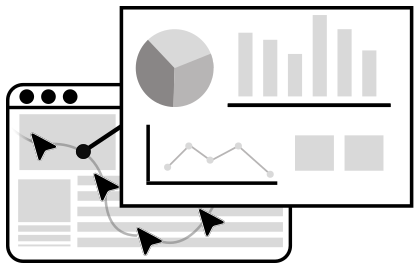
UXCascade addresses this analysis problem. It structures agent-generated feedback into a workflow that moves from goals and persona patterns to concrete issues and possible improvements.
The illustration below uses invented reasoning excerpts to show how goals and possible issues are extracted, linked to configured persona traits, and organized across runs. Open an excerpt to inspect its reasoning.
VERBOSE OUTPUT → LINKED RECORDS → ORGANIZED FINDINGS
A01 I have opened the Purchase page and can see a collection of font cards. Alaska looks suitable, and the price is visible, but I...
I have opened the Purchase page and can see a collection of font cards. Alaska looks suitable, and the price is visible, but I cannot see a control for adding it to my cart. I will look underneath the card and scroll down before deciding whether the whole card is clickable. I want to complete the purchase without opening several unrelated pages.
CONFIGURED TRAITSnew visitor · time pressure
→
Goal / extracted
Purchase a font
Traits / linked from A01
new visitor · time pressure
Possible issue / identified
Purchase controls hard to find
A02 The collection is listed at CHF 400, while the individual font card shows CHF 100. I need to understand what each amount includes before...
The collection is listed at CHF 400, while the individual font card shows CHF 100. I need to understand what each amount includes before choosing. The page mentions styles and glyphs, but that does not tell me whether the listed price covers the license I need. I will inspect another card and look for an explanation of the collection price.
A03 I can read the font name and inspect its appearance, but I do not yet know which license applies to my intended use. There...
I can read the font name and inspect its appearance, but I do not yet know which license applies to my intended use. There is some introductory purchase text, and I may need to enter the number of licenses farther down. I will search the page for licensing information before adding anything, because I do not want to choose an unsuitable option.
CONFIGURED TRAITSnew visitor · unhurried
→
Goal / extracted
Understand licensing
Traits / linked from A03
new visitor · unhurried
Possible issue / identified
License guidance hard to locate
A04 I have found the font I came for. The card gives me a price and a specimen, but I am still looking for the...
I have found the font I came for. The card gives me a price and a specimen, but I am still looking for the purchase action. I expected a button near the price. I will scroll a little farther to check whether the controls are below the current viewport rather than assume that clicking the specimen starts the purchase.
CONFIGURED TRAITSreturning visitor · time pressure
→
Goal / extracted
Purchase a font
Traits / linked from A04
returning visitor · time pressure
Possible issue / identified
Purchase controls hard to find
A05 I am comparing the collection with buying a single font. The two prices are easy to spot, yet I cannot determine whether I am...
I am comparing the collection with buying a single font. The two prices are easy to spot, yet I cannot determine whether I am comparing the same license quantities. I will revisit the purchase instructions and look for a breakdown. Until I understand what is included, I do not have enough information to decide which option fits my budget.
CONFIGURED TRAITSnew visitor · budget conscious
→
Goal / extracted
Compare prices
Traits / linked from A05
new visitor · budget conscious
Possible issue / identified
Price scope unclear
A06 I recognize the font family and know which style I want. The remaining question is the license. I can see purchase information, but I...
I recognize the font family and know which style I want. The remaining question is the license. I can see purchase information, but I have not found a clear explanation of where the font may be used. I will inspect the surrounding links and the lower portion of the page before choosing a quantity or continuing with the order.
CONFIGURED TRAITSreturning visitor · unhurried
→
Goal / extracted
Understand licensing
Traits / linked from A06
returning visitor · unhurried
Possible issue / identified
License guidance hard to locate
A07 The Alaska card is visually prominent, so I have paused here to inspect it. I can read CHF 100 but cannot find an explicit...
The Alaska card is visually prominent, so I have paused here to inspect it. I can read CHF 100 but cannot find an explicit Add to Cart action in this view. I could try clicking the card, although I do not know whether that opens a specimen or starts an order. I will first scroll to find a more explicit purchase control.
CONFIGURED TRAITSnew visitor · unhurried
→
Goal / extracted
Purchase a font
Traits / linked from A07
new visitor · unhurried
Possible issue / identified
Purchase controls hard to find
A08 I am considering whether the complete collection is better value than the individual typeface. I see both prices, but the labels do not explain...
I am considering whether the complete collection is better value than the individual typeface. I see both prices, but the labels do not explain the license assumptions well enough for me to compare them confidently. I will look for a description next to the collection heading, then check the purchase options before deciding which item to add.
A09 I want to find out whether I can use this font for my project before committing to a purchase. The page has attractive specimens,...
I want to find out whether I can use this font for my project before committing to a purchase. The page has attractive specimens, but the licensing answer is not apparent in the area I am viewing. I will scan the page headings and links for a license section. If I cannot locate it, I will need to leave this purchase flow to investigate.
CONFIGURED TRAITSnew visitor · time pressure
→
Goal / extracted
Understand licensing
Traits / linked from A09
new visitor · time pressure
Possible issue / identified
License guidance hard to locate
A10 I have selected the typeface mentally and am ready to continue. The price suggests that this is the correct product card, yet there is...
I have selected the typeface mentally and am ready to continue. The price suggests that this is the correct product card, yet there is no visible control that clearly adds it to the cart. I will move down the page and check for quantity and purchase controls. I want to see what will be added before taking an action that might change my order.
CONFIGURED TRAITSreturning visitor · unhurried
→
Goal / extracted
Purchase a font
Traits / linked from A10
returning visitor · unhurried
Possible issue / identified
Purchase controls hard to find
A11 I need to make a quick price comparison between the collection and the individual typeface. The prices alone do not make the difference in...
I need to make a quick price comparison between the collection and the individual typeface. The prices alone do not make the difference in included options clear. I will check whether selecting the card reveals a price breakdown, and then return to the collection heading if necessary. At the moment I am comparing amounts without knowing whether their coverage is equivalent.
CONFIGURED TRAITSnew visitor · time pressure
→
Goal / extracted
Compare prices
Traits / linked from A11
new visitor · time pressure
Possible issue / identified
Price scope unclear
A12 Before I choose a license quantity, I need to know what the purchase permits. I can identify the typeface and its price, but the...
Before I choose a license quantity, I need to know what the purchase permits. I can identify the typeface and its price, but the connection between that price and the licensing terms is not visible here. I will search for the license explanation and then revisit the product card. Otherwise I may choose an option that does not match the project requirements.
I have opened the Purchase page and can see a collection of font cards. Alaska looks suitable, and the price is visible, but I cannot see a control for adding it to my cart. I will look underneath the card and scroll down before deciding whether the whole card is clickable. I want to complete the purchase without opening several unrelated pages.
A04 returning visitor · time pressure
I have found the font I came for. The card gives me a price and a specimen, but I am still looking for the purchase action. I expected a button near the price. I will scroll a little farther to check whether the controls are below the current viewport rather than assume that clicking the specimen starts the purchase.
A07 new visitor · unhurried
The Alaska card is visually prominent, so I have paused here to inspect it. I can read CHF 100 but cannot find an explicit Add to Cart action in this view. I could try clicking the card, although I do not know whether that opens a specimen or starts an order. I will first scroll to find a more explicit purchase control.
A10 returning visitor · unhurried
I have selected the typeface mentally and am ready to continue. The price suggests that this is the correct product card, yet there is no visible control that clearly adds it to the cart. I will move down the page and check for quantity and purchase controls. I want to see what will be added before taking an action that might change my order.
↳Purchase controls hard to findLinked to A01, A04, A07, A10
Compare prices4 illustrative records
A02 returning visitor · budget conscious
The collection is listed at CHF 400, while the individual font card shows CHF 100. I need to understand what each amount includes before choosing. The page mentions styles and glyphs, but that does not tell me whether the listed price covers the license I need. I will inspect another card and look for an explanation of the collection price.
A05 new visitor · budget conscious
I am comparing the collection with buying a single font. The two prices are easy to spot, yet I cannot determine whether I am comparing the same license quantities. I will revisit the purchase instructions and look for a breakdown. Until I understand what is included, I do not have enough information to decide which option fits my budget.
A08 returning visitor · budget conscious
I am considering whether the complete collection is better value than the individual typeface. I see both prices, but the labels do not explain the license assumptions well enough for me to compare them confidently. I will look for a description next to the collection heading, then check the purchase options before deciding which item to add.
A11 new visitor · time pressure
I need to make a quick price comparison between the collection and the individual typeface. The prices alone do not make the difference in included options clear. I will check whether selecting the card reveals a price breakdown, and then return to the collection heading if necessary. At the moment I am comparing amounts without knowing whether their coverage is equivalent.
↳Price scope unclearLinked to A02, A05, A08, A11
Understand licensing4 illustrative records
A03 new visitor · unhurried
I can read the font name and inspect its appearance, but I do not yet know which license applies to my intended use. There is some introductory purchase text, and I may need to enter the number of licenses farther down. I will search the page for licensing information before adding anything, because I do not want to choose an unsuitable option.
A06 returning visitor · unhurried
I recognize the font family and know which style I want. The remaining question is the license. I can see purchase information, but I have not found a clear explanation of where the font may be used. I will inspect the surrounding links and the lower portion of the page before choosing a quantity or continuing with the order.
A09 new visitor · time pressure
I want to find out whether I can use this font for my project before committing to a purchase. The page has attractive specimens, but the licensing answer is not apparent in the area I am viewing. I will scan the page headings and links for a license section. If I cannot locate it, I will need to leave this purchase flow to investigate.
A12 returning visitor · budget conscious
Before I choose a license quantity, I need to know what the purchase permits. I can identify the typeface and its price, but the connection between that price and the licensing terms is not visible here. I will search for the license explanation and then revisit the product card. Otherwise I may choose an option that does not match the project requirements.
↳License guidance hard to locateLinked to A03, A06, A09, A12
Why these entry points? The formative study+
We interviewed five UX professionals. Their needs became five requirements: support frequent iteration, provide access to different perspectives, connect insights to goals, generate feedback on demand, and help prioritize findings.
IterationFit the pace of early design.
PerspectivesExplore persona-aligned feedback.
GoalsConnect breakdowns to user intentions.
On demandGenerate and revisit feedback.
PrioritizationFind actionable issues in many traces.
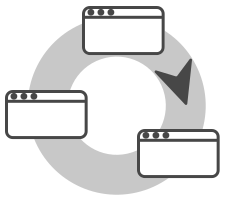
These requirements informed a workflow with three analysis stages—Explore, Observe, Isolate—and two refinement stages—Propose, Evaluate.
Start with a pattern. Follow it to the evidence.
The analysis begins with the goals agents pursued and their outcomes. Choosing a goal reveals distributions across persona traits. Selecting a trait or persona then narrows the view to concrete issues, each connected to its explanation, interface context, and place in the journey.
Explore
Goals & outcomes
Observe
Trait distributions
Isolate
UX issues & reasons
↳ Propose a fix → Evaluate a step ↺
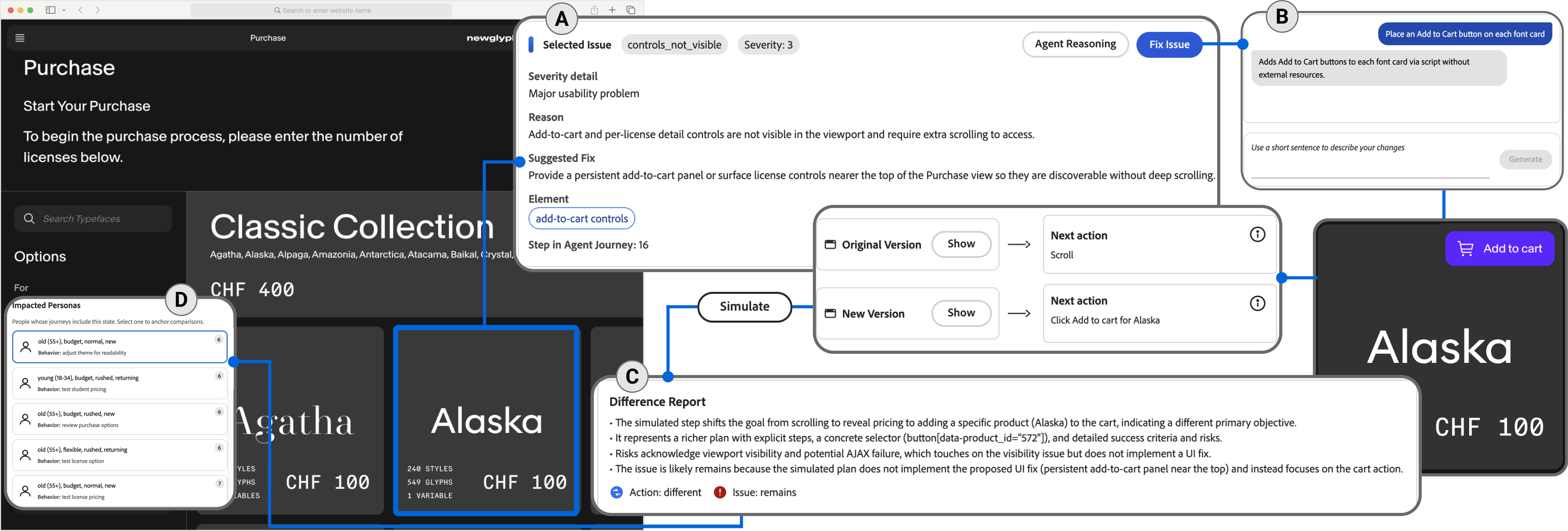
Consider the paper’s font-website example. A visitor is trying to purchase a font, but the add-to-cart and license-detail controls are not visible in the current viewport. The agent’s next action is to scroll.
The issue is not presented as a detached verdict. It is connected to the controls, the agent’s explanation, and journey step 16. A practitioner can inspect those links before deciding whether the finding is useful.
FONT WEBSITE / PURCHASE
PurchaseClassic Collection
AgathaCHF 100
AlaskaCHF 100affected controls ↓
Current viewport↓ Scroll to find controls
ISSUE / CONTROLS_NOT_VISIBLE
A purchase action that needs finding.
Add-to-cart and per-license detail controls require additional scrolling to reach.
Severity
3 / major usability problem
Journey step
16
Next action
Scroll
Reconstruction of the paper example
Inspect the original interface and provenance+
Each finding can be inspected alongside the think-aloud trace, an annotated screenshot, and a timeline of decisions. The system also includes agent-journey views for page navigation and cognitive intent.
Select the figure to inspect it at full size. This article reconstructs the visible example; its interactive scenes do not run agents.
Move from finding an issue to trying a fix
Identifying a usability issue is only a first step. UXCascade helps designers propose and explore potential remedies through direct edits or natural-language requests to an HTML snapshot.
In this example, the request is to place an Add to Cart button on each font card. Try the illustrated edit below, then replay the next step.
PROPOSE / NATURAL-LANGUAGE EDIT
“Place an Add to Cart button on each font card.”
EDITABLE SNAPSHOT
Classic CollectionAlaskaCHF 100+ Add to cart
↖
ORIGINAL SNAPSHOT
The purchase controls are out of view.
Apply the proposed edit to make the action available on the font card.
Illustrated example · no live simulation
ORIGINAL NEXT ACTIONScroll
→
AFTER THE EDITClick Add to cart for Alaska
Action: differentIssue: remains
The difference report still marks the issue as remaining. A different next action is evidence to inspect; it does not establish that the usability problem is resolved.
The replay keeps the original prompt history and evaluates one next step on the modified snapshot. This makes it a way to probe a local change. It does not establish whether an entire journey improves, or whether a real person would respond in the same way.
What is preserved, and what is re-evaluated?+
The Preview Agent receives the modified HTML while retaining the original prompt state. It produces a predicted next action and an assessment of the issue. Existing simulation data can also identify other personas who interacted with the modified element under adjacent goals.
The preview is local to a step. It does not replay a complete session, establish causal effects on human behavior, or validate a fix with human participants.
A pipeline that keeps the evidence connected.
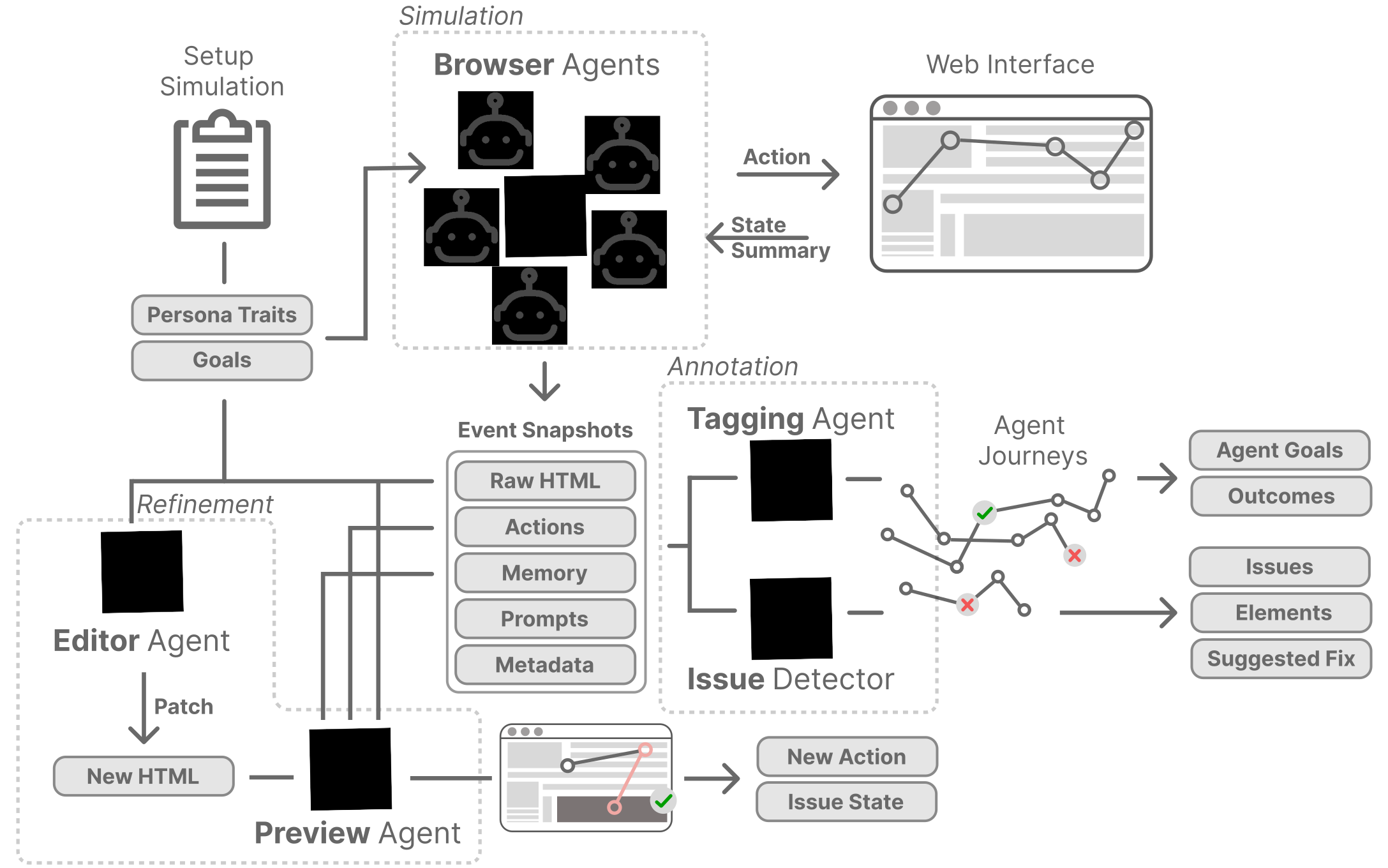
Three groups of agents support this workflow. Browser agents generate persona-grounded interactions. Annotation agents identify goals and possible issues. Refinement agents apply edits and examine a next step.
Simulateactions + reasoning
→
Annotategoals + issues
→
Refineedits + replay
CONNECTED BY EVENT SNAPSHOTSHTMLActionsMemoryPromptsMetadata
Technical implementation and full architecture+
Simulation. A custom agent built on browser-use follows a perception–decision–action loop. It receives an indexed map of interactive DOM elements and annotated screenshots, and emits structured event snapshots.
Annotation. A Tagging Agent labels high-level cognitive intent from reasoning traces. An Issue Detector identifies moments of friction, affected elements, and severity. These outputs support the goals, traits, issues, and journey views.
Refinement. An Editor Agent generates DOM-level patches from natural-language instructions. A Preview Agent evaluates the next action and issue state on the changed snapshot.
The full prompt specifications appear in Appendix C of the paper.
What did UX professionals find useful?
Eight UX professionals evaluated a clothing-shop prototype with 17 seeded usability issues. They used UXCascade and a report compiled from ten human testers, with condition order counterbalanced.
Participants valued the path from goals to traits to issues. It gave them a way to navigate the feedback and inspect individual findings. They also questioned the realism of simulated personas and described an initial learning curve.
“The breakdown by goals and traits makes it much easier to focus compared to the Baseline condition.”
P1 · UX professional
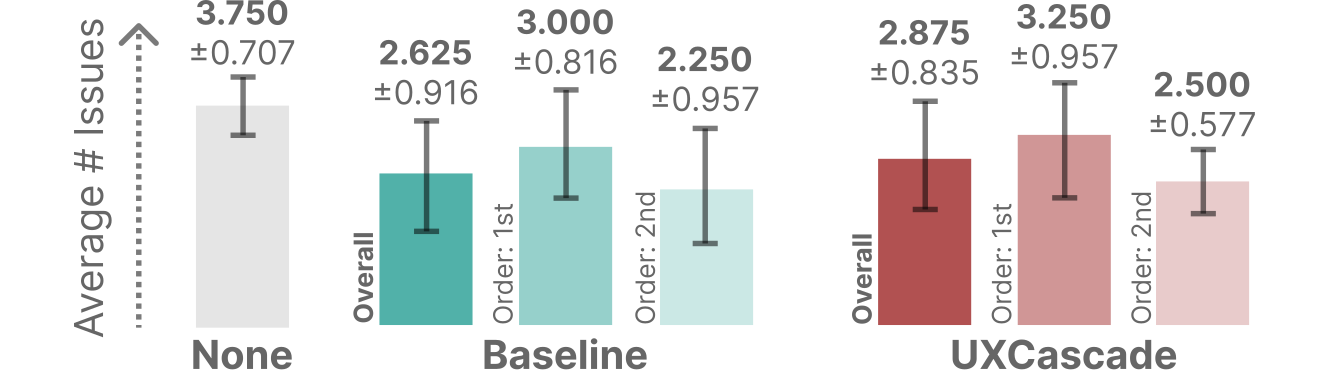
The issue-count comparison is exploratory. Participants found 2.875 seeded issues on average using UXCascade and 2.625 using the baseline report. The difference was not statistically significant.
Participants examined the same website repeatedly. Both assisted conditions produced fewer new findings when used second, so order matters when interpreting the results. This comparison does not establish equivalence to human testing.
The sources also surfaced different issues. Agent output directly covered 9 of the 17 seeded problems; the human report covered 11. Neither contained everything. These are source-coverage counts, distinct from how many issues practitioners reported while using each source.
Seeded issue categoryAgent outputHuman report
Discovery & interaction
2/7
5/7
Accessibility & communication
5/7
5/7
Visual design & performance
2/3
1/3
Study protocol, statistics, and workload+
Participants first explored the prototype unaided for 7 minutes, then used each assisted condition for 10 minutes. The initial unaided phase produced a mean of 3.750 issues (SD 0.707); it always came first, so it is not an equivalent randomized condition.
A Wilcoxon signed-rank test of per-participant assisted-condition counts found no significant difference (W = 6, p = .813). With only eight participants and repeated exposure to one website, the findings should be read as exploratory.
The agents used four binary traits: price sensitivity, time pressure, age cohort, and user type, producing 16 combinations with two agents per combination (32 agents). This is one study configuration, not a validated taxonomy of users.
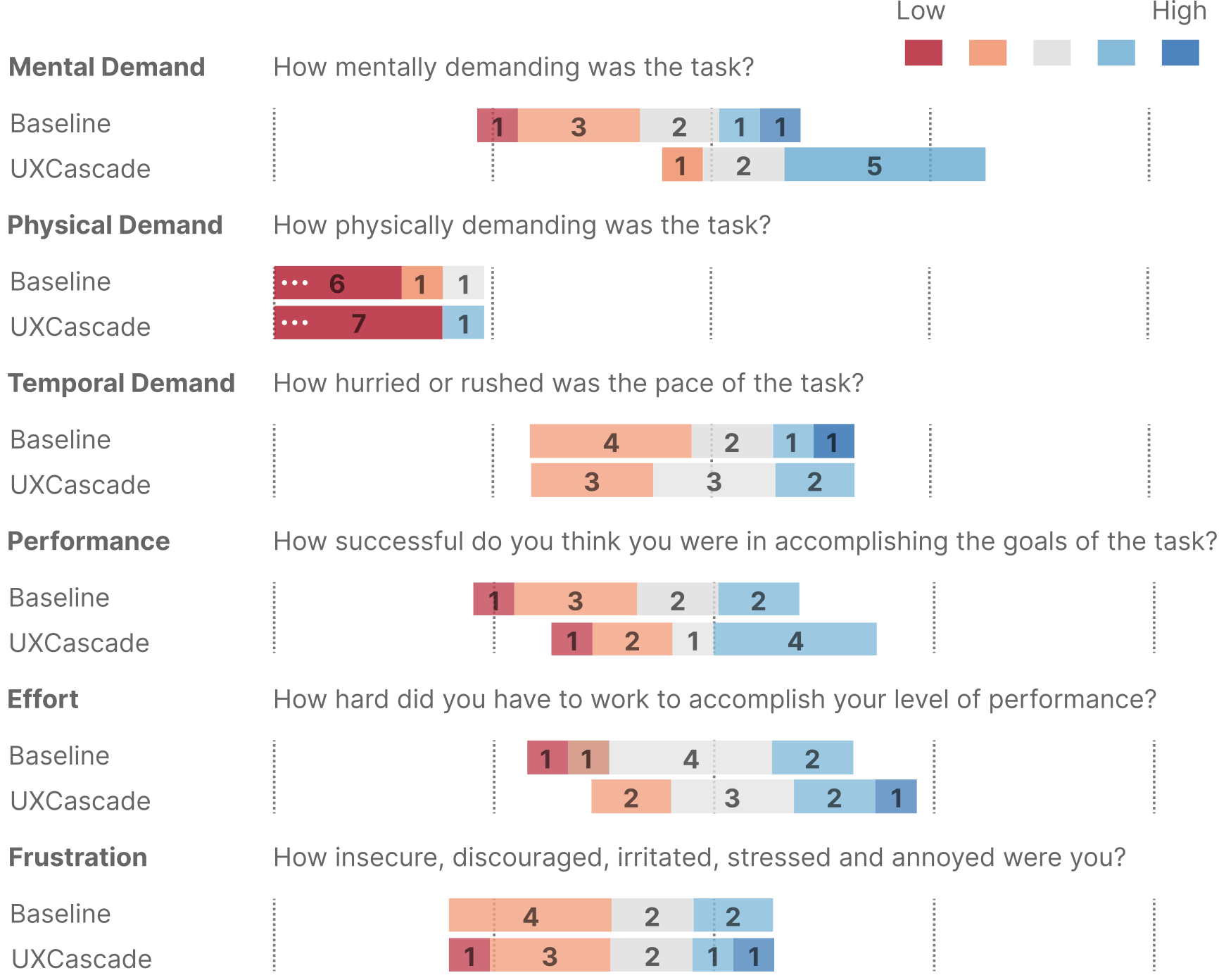
No NASA-TLX dimension differed significantly between conditions. Participants described the benefits of structured navigation alongside the effort required to learn the richer interface.
The paper details source-to-issue mapping, coverage, and the qualitative analysis in Section 6.
Simulation is a starting point for investigation.
The value of UXCascade is the connection between an overview and the evidence behind a finding. A practitioner can move from a pattern, to a particular interaction, to a change worth testing.
That connection does not remove the limitations of simulation. Persona labels do not guarantee realistic behavioral differences. Agents can miss visual cues and nuanced human reactions. A single-step replay provides only a small piece of evidence about a design change.
Better simulations will generate more feedback. The enduring question is how to help people inspect, interpret, and act on that feedback—while retaining the judgment to question it.
THE CONTRIBUTION
From many simulated interactions to focused, inspectable findings.
@inproceedings{holter_2026_uxcascade,
  author = {Holter, Steffen and Koh, Eunyee and Dogan, Mustafa Doga and Chan, Gromit Yeuk-Yin},
  title = {UXCascade: Scalable Usability Testing with Simulated User Agents},
  year = {2026},
  isbn = {9798400728563},
  publisher = {Association for Computing Machinery},
  doi = {10.1145/3830398.3830609},
  booktitle = {Proceedings of the 39th Annual ACM Symposium on User Interface Software and Technology},
  articleno = {127},
  numpages = {17},
  keywords = {Agentic workflows, human-AI collaboration, UX evaluation},
  series = {UIST '26}
}